


Import an Online Class
Published 11 Jan 2022Updated 11 Jan 20221 min read
Notes:
- Please only use these steps only once in the begging of the semester.
- Kindly check your email since you will be receiving an email from ajmanuniversity@ajman.ac.ae which will contain your meeting information.
- Zoom meetings were created based on banner and it is only created for the primary instructor.
You can import an online class (zoom meeting) by following the below steps:
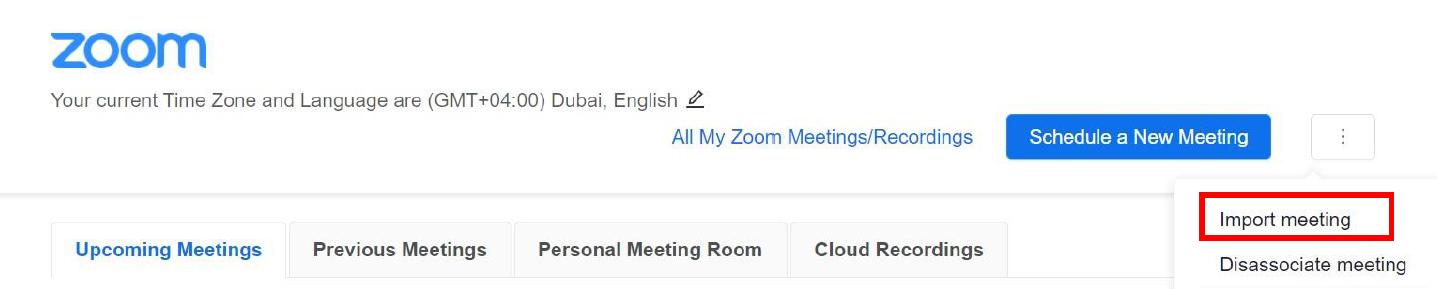
- Once you click on Zoom button, click on the three dots.

- Click on Import meeting.
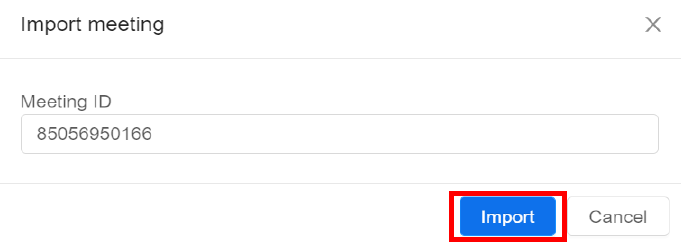
- Specify the meeting ID provided via email then click on Import.
Was this article helpful?
Related articles
Zoom
Original source: https://it.ajman.ac.ae/docs/import-an-online-class