


Access the Attendance Report
Published 7 Jul 2021Updated 26 Jul 20211 min read
Watch our video tutorial about accessing the attendance reports through Zoom portal below:
You can access the attendance report by following the below steps:
- Enter the course page and click on Zoom.
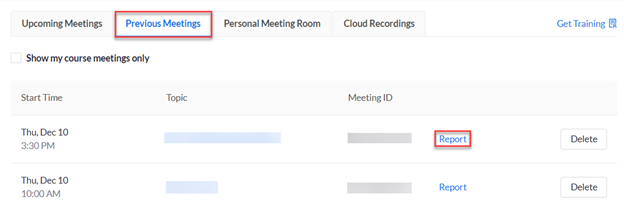
- Under the Previous Meetings section, you will have a list with all the previous sessions where you will be able to access the reports by clicking on Report.
Was this article helpful?
Related articles
Zoom
Original source: https://it.ajman.ac.ae/docs/access-the-attendance-report