


Access Your Student Records
By Khadija AhmedPublished 29 Jun 2021Updated 19 Aug 20231 min read
To access the student records, please follow the below steps:
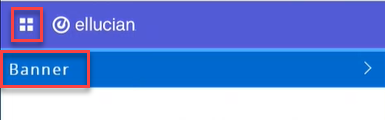
- Click on the menu located on the left, then click on Banner.
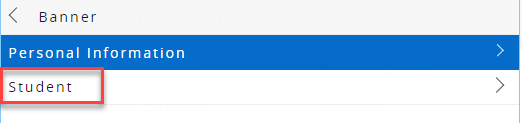
- Click on Student.
- Click on Student Records.
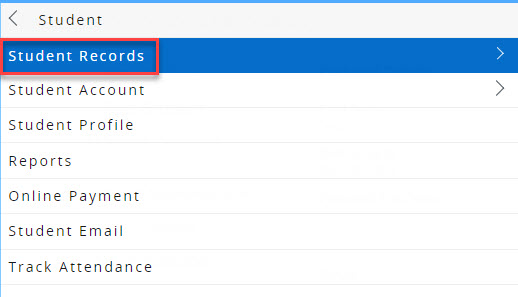
In this section, you will be able to perform the following:
View Holds
This will allow you to view any holds that might be affecting your enrollment progress and it will guide you on its details such as the reason behind the hold and the process it affects, as illustrated below.
View Student Information
You will be able to view your information and the current program you are enrolled in.
View Grades
Once grades are released, you will be able to select the term and view your grades accordingly.
Was this article helpful?
Related articles
Banner SIS
Original source: https://it.ajman.ac.ae/docs/access-your-student-records