


Sign In to AU Connect
By Khadija AhmedPublished 8 Nov 2022Updated 8 Nov 20221 min read
To sign in to AU Connect, please follow the below steps:
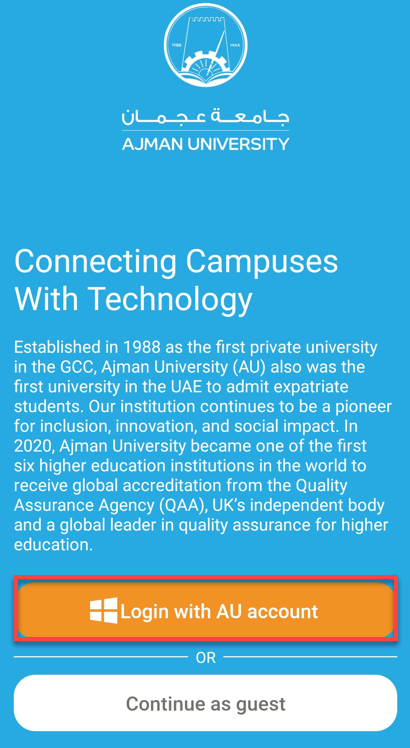
- Click on Login with AU account.
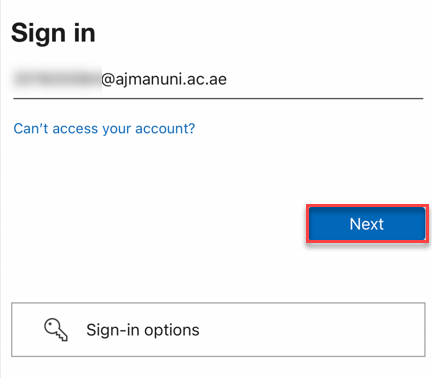
2. Enter your AU email address, then click on Next.
3. Enter your Password, then click on Sign in.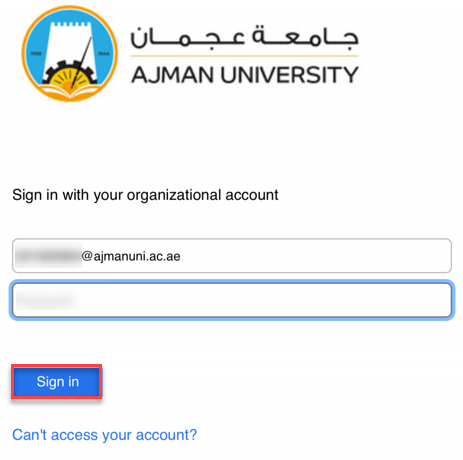
Note: if you face an issue while signing in, please contact the IT helpdesk.
Was this article helpful?
Related articles
AU Connect Mobile App
Original source: https://it.ajman.ac.ae/docs/sign-in-to-au-connect-1