

Document Metadata
6 articles
Laserfiche documents can contain additional information, besides that contained in the actual images, text and electronic files. This information is called metadata.
You can view a document's metadata by opening the metadata dialog directly, or by viewing the document in the Document Viewer. To open the metadata dialog directly:
- Select a document and open the Action menu.
- Select the metadata type you want to view: View Fields, View Tags, View Document Links or View Versions.
The Metadata dialog has four tabs – one for each metadata type – and the tab for the metadata type you selected will automatically be opened.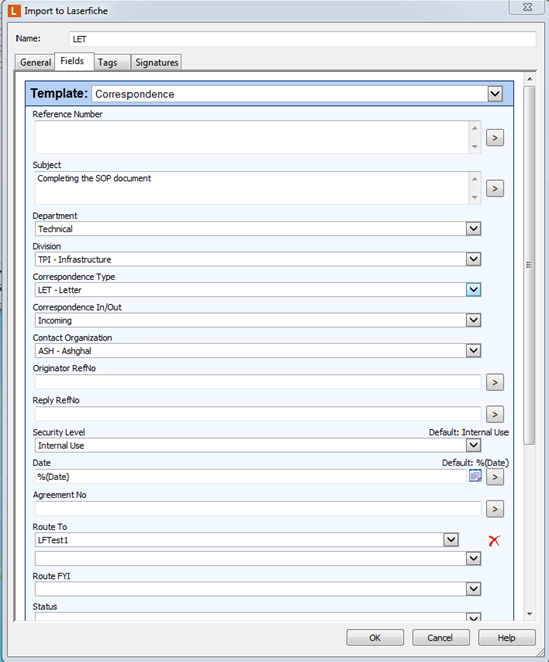
In this category you will learn about:
- Working with Templates
- Working with Tags
- Working with Links
- Working with Versions
- Referencing System by the Documentation Center
- Digitally sign documents
articles
- Working with TemplatesTemplates allow you to attach a variety of metadata to documents. A template consists of a collection of template fields, each of which holds a specific item…Updated 28 Dec 2021 · 1 min read
- Working with TagsTags are an optional method for categorizing documents that can be added to or removed from a document at any point. There are two types of tags: informational…Updated 28 Dec 2021 · 1 min read
- Working with LinksDocument Links are ways of connecting two documents, regardless of where they might be in the repository. If you have linked two documents, they will remain…Updated 28 Dec 2021 · 2 min read
- Working with VersionsVersions allow you to save modifications to a document as a different, but related, document. It also allows you track changes, prevent information loss,…Updated 28 Dec 2021 · 2 min read
- Referencing System by the Documentation CenterThe reference number has four parts as shown in this example: 10/1/1234/2021.The first part indicates the departmentThe second part indicates the document…Updated 28 Dec 2021 · 1 min read
- Digitally sign documentsLaserfiche supports the ability to apply digital signatures to documents. You can also view who signed a document and if the document has been altered since it…Updated 28 Dec 2021 · 1 min read